Laser Scanner Workflows for Vehicles, Equipment, and Industrial Parts
May 19, 2026
The Competitive Advantage of Using an FDM 3D Printing Service
May 21, 2026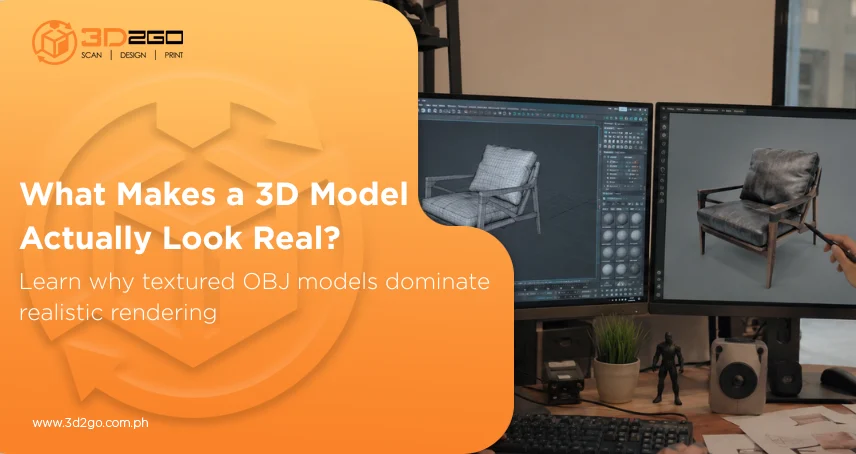
A 3D model can have perfect proportions and technically accurate geometry, but without proper surface detail, it still feels artificial.
That’s because realism in 3D work depends heavily on textures. The scratches on metal, the grain of wood, fingerprints on glossy plastic, or the subtle roughness of concrete all help digital objects feel believable once rendered.
This is one reason why custom OBJ file creation remains widely used across professional workflows. The format supports reliable geometry transfer while efficiently handling detailed material and texture data.
For industries focused on rendering, visualization, gaming, architecture, and product design, obj models with textures continue to be one of the most practical formats for producing realistic digital assets.
Why the OBJ Format Continues to Be Widely Used
The OBJ format has existed for decades, yet it remains highly relevant because of its simplicity and compatibility.
Originally developed by Wavefront Technologies, OBJ files store geometry information such as vertices, polygon faces, and edges using a readable text-based structure. Unlike proprietary formats tied to specific software, OBJ files can be opened across nearly every major 3D application.
That flexibility matters in real-world production. Most professional projects involve multiple tools and workflows. A model might begin in Blender, move into Maya for animation, then transfer into Unreal Engine for rendering or interactivity.
Because obj models with textures transfer reliably between applications, teams avoid compatibility issues that often slow down production pipelines.
How Textures Improve Realism in 3D Models
Without textures, most 3D objects appear flat and lifeless, regardless of how detailed the mesh is. Texture maps allow digital objects to behave more like real materials under lighting conditions.
Professional obj models with textures often use multiple texture layers, including:
- Diffuse maps for base color
- Normal maps for simulated surface depth
- Roughness maps for light behavior
- Specular maps for reflections
- Ambient occlusion maps for shadow depth
These layers work together to create a realistic surface response.
For example, polished metal reflects light differently from worn concrete. Even if both objects use identical geometry, textures completely change how they appear in a rendered scene.
That flexibility is a major reason why obj models with textures remain standard in realistic 3D production.
Why Texture Mapping Matters More Than Most People Realize
Applying textures correctly is just as important as the textures themselves. A process called UV mapping determines how a flat texture image wraps around a 3D surface. Poor UV layouts create stretching, visible seams, distorted patterns, and inconsistent material scaling.
Professional obj models with textures rely on carefully planned UV workflows to ensure textures appear natural from every angle. Texture seams are hidden strategically, scaling remains consistent, and surface patterns align correctly with the geometry.
Common Industries Using Textured OBJ Models
The use of obj models with textures extends far beyond gaming or entertainment.
Architecture and Real Estate
Architectural firms use textured 3D assets to visualize materials before construction begins. Clients can review wood finishes, flooring textures, glass reflections, and wall surfaces through realistic renderings.
This helps speed up approvals while reducing uncertainty during design planning.
Product Design and Manufacturing
Product developers rely on textured models to evaluate surface finishes before manufacturing starts.
Whether designing electronics, furniture, packaging, or industrial products, realistic visualization helps teams identify design concerns earlier in the process.
Gaming and Interactive Media
Game environments require highly detailed assets that respond naturally to lighting conditions from multiple angles.
Efficient, reliable obj models with textures enable developers to build immersive environments while maintaining consistent visual quality.
E-Commerce and Product Visualization
Many brands are moving toward 3D product visualization instead of relying solely on photography.
According to research, the global 3D modeling market is projected to grow significantly through 2030, driven partly by increased demand for digital product visualization and interactive online experiences.
That demand continues to increase the need for realistic obj models with textures across retail and marketing industries.
Why File Organization Is Important in Professional Workflows
A model can look perfect during development but fail during transfer if files are poorly organized.
Professional obj models with textures typically include:
- A properly exported OBJ file
- A linked MTL material file
- Organized texture folders
- Correct texture path references
Without these elements, textures may fail to load correctly in different software environments. This is a common issue in collaborative workflows where files move between artists, designers, developers, and rendering teams.
Why OBJ Works Well Across Different Software Platforms
One reason obj models with textures continue to dominate professional workflows is cross-platform compatibility. Many newer file formats offer advanced features, but they can introduce software limitations or compatibility issues depending on the pipeline.
OBJ files remain practical because nearly every major 3D application supports them directly.
That reliability becomes especially valuable when projects involve:
- Multiple artists
- Different rendering engines
- Cross-department collaboration
- External production teams
The ability to move assets smoothly between platforms saves both time and resources.
The Difference Between Basic and Professional Texture Work
Not every textured model is built to production standards. Professional obj models with textures involve more than simply applying stock materials to a mesh.
Experienced teams pay attention to:
- Material realism
- Texture resolution
- UV consistency
- Lighting response
- Render optimization
Matching real-world materials accurately often requires advanced texture development and careful surface observation. For product visualization, even small inaccuracies in texture quality can affect how realistic the final render feels. That’s why professional texture work tends to stand out immediately.
Why Businesses Work With Experienced 3D Modeling Teams
Businesses investing in realistic 3D assets often prioritize consistency, compatibility, and rendering accuracy. Experienced teams understand how textured assets behave across different platforms, lighting conditions, and production environments.
3D2Go supports businesses with professionally developed obj models with textures designed for visualization, rendering, prototyping, and digital production workflows.
Their modeling services cover industrial products, architecture, consumer goods, and custom digital assets built for real-world applications—not just preview images.
With organized file preparation, proper UV workflows, and production-ready outputs, projects move more smoothly from concept to final presentation.
Realistic 3D Work Depends on More Than Geometry
Textures help digital assets feel believable by adding material identity, lighting response, and fine visual detail that geometry alone cannot achieve. That’s why obj models with textures continue to play a major role in architecture, product visualization, gaming, manufacturing, and digital media workflows.
The OBJ format remains widely trusted because it combines compatibility, flexibility, and reliable texture support across multiple platforms and production pipelines.
For businesses investing in high-quality digital assets, getting texture workflows right early in the process can significantly improve rendering quality, production efficiency, and final presentation results.
3D2Go helps businesses create detailed, production-ready textured models built for professional visualization and digital manufacturing workflows.